
Go back
E-commerce Marketplaces Uncategorized

Ad extensions make you more visible

Gain insight into how ad extensions increase your visibility on Google Ads and improve your ad performance with additional information and links.

02 Jan 20254min. reading timeThomas HaurumThomas Haurum

In addition to your actual Google Ads campaign, you have the option to add ad extensions to your Ads. What they are is probably self-explanatory, but if you are not yet familiar with the possibilities, here you will find an overview. We will also share a number of good tips for using ad extensions in Google Ads. And did I mention that using ad extensions in Google Ads is completely free? Of course, you still pay for clicks on your ads, but there is no extra cost to add ad extensions, so if you are not already using them in your Google Ads campaigns, what are you waiting for?

What types of ad extensions are available in Google Ads?

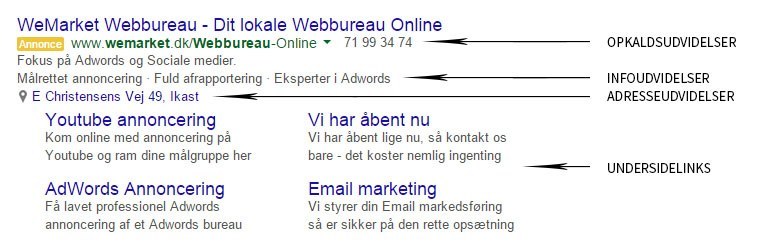
There are several different types of sitelinks you can create. Which sitelinks appear and how often they are shown will vary, but we always recommend including sitelinks in your Google Ads campaigns. Below you’ll find an overview of the various Google Ads ad extensions and what each of them can do.

The example above shows how ad extensions can make a Google Ads advert appear. This will vary from search to search, and if you search for the same thing twice, your Google Ads ad extensions may not look identical each time.

Sitelinks help your customers – and make your ad stand out

Sitelinks allow you to direct customers to several landing pages, not just the main landing page of your Google Ads campaign. For example, sitelinks can be used to display related products if you run a webshop. If you would rather be contacted by customers, a sitelink to your “Contact us” page can be an excellent addition, and including “Opening hours” may also be relevant. Up to six sitelinks can be displayed in your ad, though the actual number may vary. In the Google Ads interface, you can view detailed statistics on your ad extensions, including sitelinks. For instance, you can see how many clicks ads with sitelinks receive, and what the click-through rate (CTR) is compared to ads without sitelinks. If you are interested in seeing which sitelinks have been clicked and whether these clicks have converted, you can check this in Google Analytics.

Callout extensions show why you are the best choice

With callout extensions in your Google Ads, you can add short snippets of text to your ads to highlight your USPs (why customers should choose you). Examples include “Free delivery”, “Best in test”, “Fast shipping” and so on. Up to four callout extensions can be shown per ad, but the number may vary and they will not always appear.

Location extensions help customers find you

If you have a physical shop, location extensions are ideal for your Google Ads. They are especially likely to be shown to users close to your address. If a user is searching on a mobile device with GPS enabled, they can even be guided directly to your door with directions. To use location extensions, you need a Google My Business profile linked to your Google Ads account. Many large retailers use location extensions, so chances are you have come across this type of extension before.

Call extensions generate calls and leads for you

Let customers call you directly. With call extensions in your Google Ads, potential customers can call you straight from your ad when searching on a mobile device. If the search is conducted from a computer, your phone number will still appear, making it easy to dial in. In other words, call extensions are a straightforward way to generate leads for you as a Google Ads advertiser, and it couldn’t be easier for customers to get in touch.

App extensions make it easy for customers to download your app

If you have a mobile or tablet app, app extensions can help you gain more users by linking directly to the Apple App Store or Google Play. Google Ads automatically detects which app store to use based on the device (Android or iOS). App extensions are of course only relevant if you have an app in one of these app stores. If you offer an app for easy ordering from mobile or for a loyalty programme, this is a great opportunity to promote your app. Customers will often see this as a service rather than a pure advertisement, so feel free to use app extensions in your Google Ads.

Review extensions let others tell customers why they should choose you

At the time of writing, review extensions in Google Ads are not available in Danish. However, they do appear in the Google Ads interface and Google provides information about them in Danish. Review extensions have been active in the US since June 2013, so hopefully we will have access to them here soon.
With review extensions, you can include customer testimonials or excerpts thereof in your Google Ads. The content must come from a third-party source, so you cannot simply invent customer reviews. In other words, review extensions allow your customers to tell others how good you are – which is often more effective than saying so yourself.

Automated extensions make you look even better

Automated ad extensions are, in short, extra features that Google automatically adds to your ads. Unlike other ad extensions, you do not need to write these yourself. They may display whether a user has previously visited your site, include customer reviews, or show social extensions.
Customer reviews are collected from third-party sites (Google+, TrustPilot, Yelp, etc.), so to influence these, you must ensure you receive positive reviews from your customers. Social ad extensions display how many followers you have on Google+. For these to be shown, your website must be linked to your Google+ page and you must have at least 100 reviews.

Automated ad extensions are shown when Google’s algorithms predict a higher chance of clicks and conversions on your ad.

The benefits of using ad extensions

When WeMarket creates campaigns for clients, we always make use of ad extensions. There is no additional cost to our clients for using them, apart from the potential cost of a higher click-through rate. Ads with ad extensions typically achieve a higher click-through rate, which in turn generates more leads for you as a client. If you achieve a higher expected click-through rate, your Quality Score increases, leading to a better AdRank (higher position and/or lower click prices).

  • Take up more space than your competitors
    Few things are worse than seeing your competitors in the search results – and even worse when your potential customers see them first. With ad extensions, your ads take up more space, making you more visible to prospective customers.
  • Help your customers
    Ad extensions allow you to make life easier for your future customers. Make it simple to call you, find related products or services, discover your address, and – most importantly – understand why they should choose you.
  • Generate more leads
    Using ad extensions generally leads to a higher click-through rate, resulting in more leads. In short, it’s a win-win to use ad extensions.

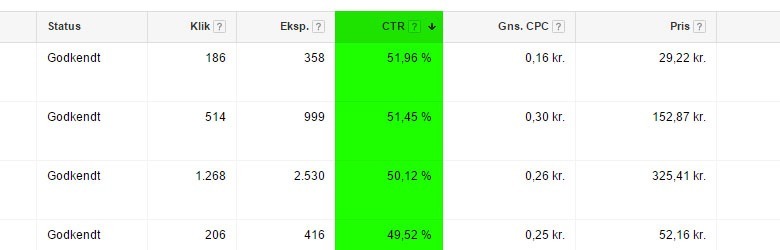
By using ad extensions, you can usually increase your CTR (click-through rate). Above you see an example of a high click-through rate on ads with sitelinks.

Use your ad extensions effectively

Before you start using ad extensions in your Google Ads account, it’s a good idea to read Google’s policies for this area. If your ad extensions do not comply with the policies, they will not be shown, and any time you spent creating them is wasted. This naturally also applies to Google Ads in general.

How to use your ad extensions most effectively will differ from account to account. It is fine to gather inspiration, but don’t simply copy your competitors. You need to stand out, so look at what they may be doing well and what they could improve – then create your own ad extensions based on that, but even better!

When creating your ad extensions, always keep your target audience in mind, just as with all other marketing. What motivates them to buy and what catches their interest? Both your ad and, importantly, your ad extensions should reflect this.

Ad extensions are easy to create

If you are keen to take advantage of the potential of ad extensions, here is a quick illustration of how easy it is to find where to create them yourself.

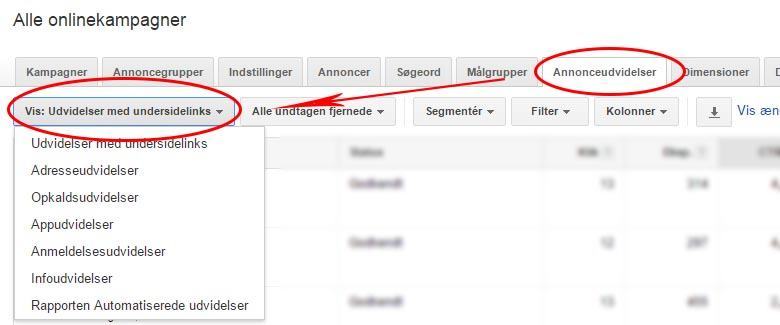
When you are in your Google Ads account, select the “Ad extensions” tab, which I have marked with a red circle. Then choose “Show: xxxxxx”, which I have also marked with a red circle.

This will bring up the tab shown above, where you can select the ad extension(s) relevant to your account. Once you have chosen the desired extensions, look for the red “+ Extension” button, as shown in the example below.

Let your ad extensions lower your click prices on Google Ads

By increasing your CTR, you also increase your chances of achieving a higher Quality Score. If you want lower click prices, you can read more in this blog post about lower click prices on Google Ads.

If all this seems a bit confusing, don’t worry. WeMarket are specialists in this area and are always happy to help you – contact us here!

Do you want to see what your competitors and your industry are doing best?

At WeMarket, we offer businesses a benchmark report that compares their marketing efforts with their key competitors. You decide which competitors we should compare against.

We specialise in selling physical goods online and growing webshops – and now you can benefit from this expertise, even if you’re not already a client.

It’s completely free.

  • 1.

    Competitor screening

  • 2.

    Industry potential

  • 3.

    Recommendations