Go back
E-commerce Marketplaces Uncategorized

Meta text recommendations (2025 guide)

A guide to writing effective meta descriptions that improve your click-through rate, boost your visibility in search results, and attract more visitors to your website.

03 Jan 20253min. reading timeJannick TroelsenJannick Troelsen

Are you working with Facebook advertising and have encountered the issue that your ad contains too much text? Then you’ve come to the right place. In this blog post, I will explain two key things you need to know when advertising on Facebook, as well as the text amount recommendations that Facebook applies.

Table of contents

IMPORTANT: Whether you are boosting posts or using Facebook Ads Manager to create your ads, you are still subject to all the recommendations listed below.

Read more about how to approach Facebook advertising in Ads Manager »

What is Meta’s 20% text recommendation?

Before 2020, Facebook had a rule known as the “20% rule” – this rule no longer applies, but it is still recommended to keep the amount of text on any image below 20%. Previously, an ad would be outright rejected if your graphic contained more than 20% text. The rule was not just there to annoy advertisers like you and me – but to help us deliver a better user experience for those who see our ads on Facebook. It is therefore still advisable to stick to Meta’s 20% text recommendation.

Changes to the 20% text rule

At the end of 2020, Facebook’s 20% text rule was discontinued, meaning that an ad image with more than 20% text would no longer be rejected. Instead, Meta states that ads with less than 20% text are more effective, so you may experience reduced delivery if this recommendation is not followed. Meta therefore advises advertisers to keep image text short, clear, and precise to ensure your message is delivered as effectively as possible.

Avoid too much text on your ad images

It can be challenging to narrow down your message, but here are three tips to help you avoid too much text on your ad images.

  • If you need to include text on the image, try using fewer words and/or reduce the size of the text. However, be aware that if the text is too small, it may be difficult to read.
  • Make sure most of your text is in the body copy rather than directly on the ad image.
  • Avoid spreading text across the entire image.

Guide to setting up Photoshop for Meta’s text recommendations

  • Open Photoshop
  • Click “Edit” in the top bar
  • Click Preferences (at the bottom of the Edit menu)
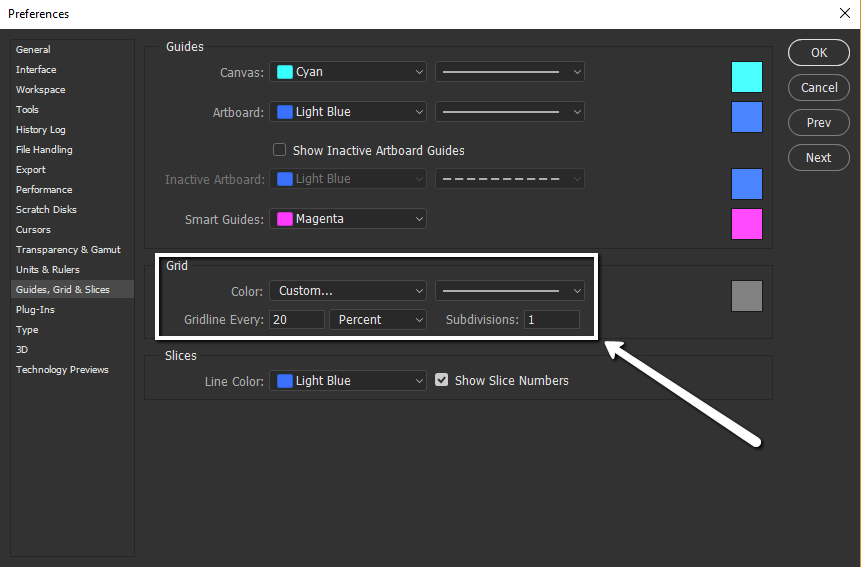
  • Open “Guides, Grid & Slices”
  • Set your preferences as shown below. NOTE: Set it to “percent” and then enter 20 and 1 in the other fields.

This means that when you enable Grid in Photoshop, your graphic will be divided so you can check the percentages in the same way Facebook does. It’s a slightly unusual method.

To enable grids, do the following:

  • Go to the top menu under “View”
  • Click “Show”
  • Activate “Grids”

Alternatively, you can also create a shortcut if you want to toggle it on and off quickly.

Check whether you meet Facebook’s text guidelines directly in your programme (Photoshop used as an example)

Traditionally, when you think about percentages, you’d expect that the text on your graphic must not make up more than 20% of the entire image – as a whole. Unfortunately, that’s not how Facebook assesses it. Two completely identical pieces of text, simply positioned differently, can make all the difference between meeting the recommendations or not. This is where you need your grid that you (hopefully) just set up using the guide above.

In the two images below, I have tried to illustrate how Facebook calculates the text on your ad.

(Read more about standard image sizes for Facebook here)

The grid you have set up in Photoshop can be used regardless of your image size without needing to adjust anything. I am not sure how this works in other programmes.

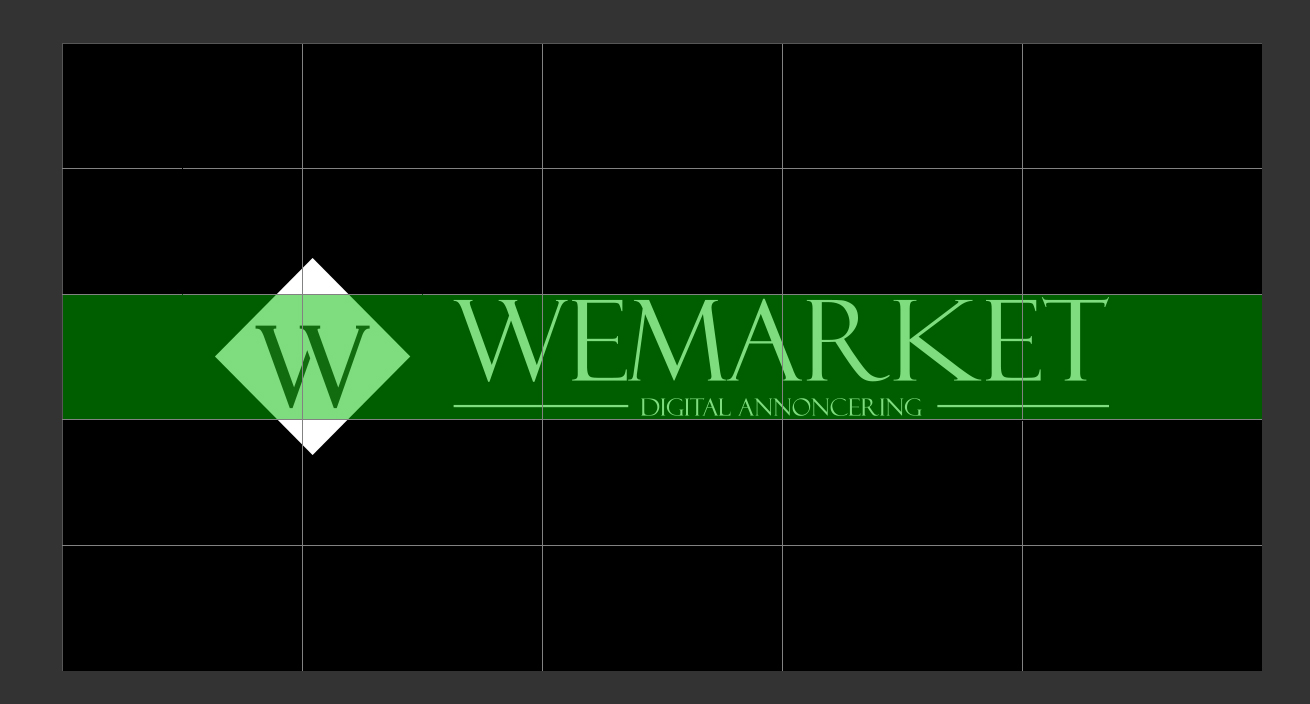
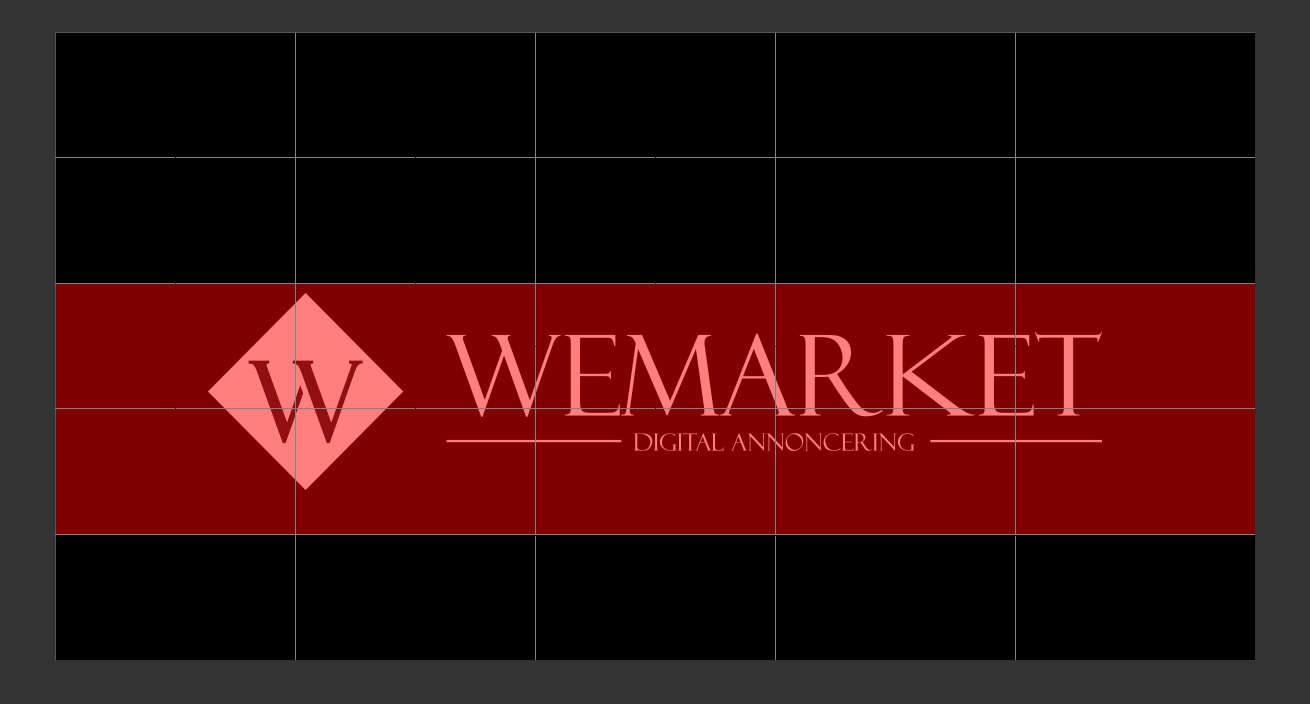
Imagine that each square in the grid represents 4%, and you need to try to stay under the 20% that Facebook recommends as the correct amount of text on their ads. In the images below, I show how two almost identical images can be seen very differently – in Facebook’s eyes. They are both screenshots of my Photoshop setup, so you can see my grids.

20% recommendation complied with:

The green squares show where there is text. 5 squares times 4% – this lands us exactly where Facebook wants us to be.

20% recommendation NOT complied with

Notice that the text size has not changed. It has just been moved 50-80 pixels down. Now, all of a sudden, we are at 40% text in Facebook’s eyes, even though there is no more text in reality. The lower image would likely end up being deprioritised by Meta and could potentially cost you 2-5 times as much to get impressions. That’s a quick and easy way to save money 😉

Speaking of Facebook ad costs – you can read more about it here: How much does Facebook advertising cost? There are also some tips on how to save money!

If you do not use Photoshop, you can alternatively use Facebook’s own tool, which you can find here: https://www.facebook.com/ads/tools/text_overlay

Do you want to see what your competitors and your industry are doing best?

At WeMarket, we offer businesses a benchmark report that compares their marketing efforts with their key competitors. You decide which competitors we should compare against.

We specialise in selling physical goods online and growing webshops – and now you can benefit from this expertise, even if you’re not already a client.

It’s completely free.

  • 1.

    Competitor screening

  • 2.

    Industry potential

  • 3.

    Recommendations